
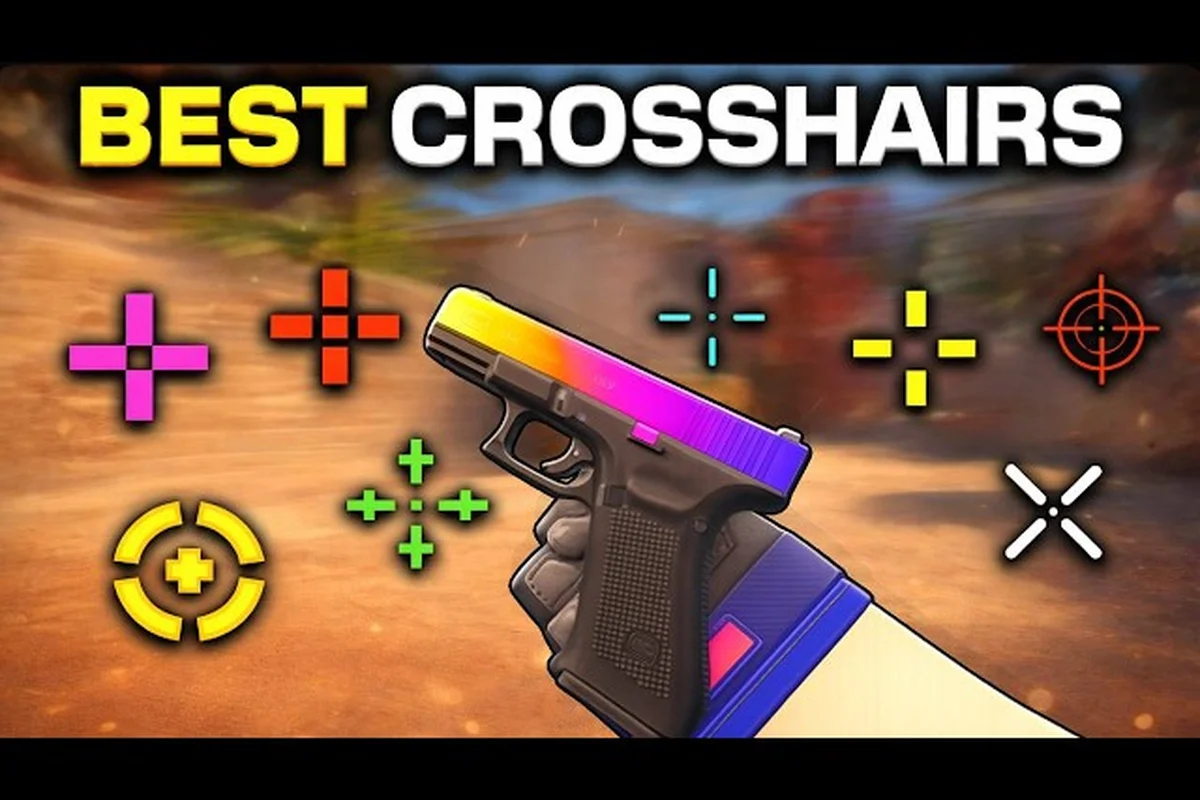
Crosshair setup in BloxStrike is one of the highest-leverage settings you can change, and most players leave it on the default. The right BloxStrike crosshair settings sharpen spray control, make tap shots feel snappy, and keep head-level angles readable across every map. This guide covers color, gap, thickness, dot, and movement options with practical picks for entry fraggers, AWPers, and lurkers, plus a step-by-step tuning method you can finish in a single deathmatch warmup.
Why Crosshair Choice Matters in a 5v5 Tactical Shooter
BloxStrike is built around tight 5v5 rounds where the bomb plant and defuse objective rewards players who land the first bullet. The game launched on the official BloxStrike Roblox game page and grew past 293M visits with a 94.6% positive rating by October 2026, which means the average opponent you face has spent real time refining setup. A clear, well-sized crosshair reduces the gap between seeing an enemy and converting the kill, especially in close spray duels where the first eight bullets decide the trade.
Three mechanics make crosshair tuning especially impactful in this title: positional recoil resets that punish a crosshair placed too high, the short 0.4–0.6 second peek windows that punish thick reticles, and the shifting map palettes across Oasis, Reactor, and Dust that punish a one-color-fits-all setup — each one of these tightens the margin where the crosshair is the difference between a trade win and a wasted magazine.
-
Recoil resets are positional. Weapons in BloxStrike pull upward and slightly sideways during sustained fire, and the crosshair has to be low enough at the start of the spray to give the recoil pattern room to land on the head.
-
Peek windows are short. A bulky crosshair covers the angle you are swinging into, so thinner reticles win information fights.
-
Map palettes vary. Oasis, Reactor, and Dust use different lighting tones, and a crosshair color that pops on Reactor can vanish against the sandy walls of Dust.
A practical crosshair in BloxStrike is the one you can read at a glance, track through a 0.5-second jiggle peek, and still drop onto a head height of roughly 1.2 crosshair-units on a still target. Every choice below — gap, thickness, color, dynamic or static — is filtered against that three-part test, because in a 5v5 round where a single bullet decides the trade, the crosshair that wins is the one that never forces a mental adjustment mid-fight.
Reading the Crosshair Menu: Every Knob Explained
BloxStrike exposes the crosshair controls through Settings → Crosshair, and the menu is identical in the lobby and inside a private server. Knowing what each slider does saves you from guessing and lets you lock in a setup based on what the rest of your sensitivity and audio are doing. The community at r/bloxstrike regularly shares screenshots of their crosshair codes, and the most upvoted builds always start from this menu rather than third-party tools.
| Setting | Range | What It Changes | Practical Sweet Spot |
|---|---|---|---|
| Style | Static / Dynamic / Classic | Whether the reticle expands during fire and movement | Static for new players, Dynamic for spray transfer practice |
| Color | Green / Yellow / Cyan / White / Red / Magenta / Custom | Visibility against map backdrops | Cyan or green for most maps, magenta on Dust |
| Center Dot | Off / On | A 1px center pip for tap shots and pistol duels | Off for spray, On for AWP and Deagle |
| Length | 0–20 px | How far the four lines extend from the center | 6–8 px for spray, 3–4 px for AWP |
| Gap | -4 to +12 px | Space between the center and the start of each line | 0 to +2 for static, +3 to +6 for dynamic |
| Thickness | 0.5–3 px | Line weight, which affects visibility at distance | 1 px for clean sight, 1.5 px on busy maps |
| Outline | Off / 0.5–2 px | A dark or light border around each line for contrast | 0.5 px black outline on bright maps |
| Movement Error | Off / On | Shrinks the crosshair when moving and expands it when still | On for tracking drills, Off for spray transfer |
| Fire Error | Off / On | Adds recoil-style jitter to mirror weapon pull | On for spray practice, Off for ranked play |
The Style and Color choices are the two that matter most for first impressions, but they also anchor the entire visual language your reticle will use for the rest of the match. Switching from Static to Dynamic, for example, changes how the gap behaves while firing, so any Gap value tuned for a tight Static reticle will look completely different once Movement Error and Fire Error start expanding the lines during a spray transfer. Color is even more contextual: cyan reads cleanly on most bloxstrike maps but gets lost on the bright sandstone walls of Dust, which is why the most upvoted crosshair codes on r/bloxstrike almost always pair a high-contrast color with a 0.5 px black Outline for the maps that wash it out. Length and Gap then define the silhouette of your reticle, locking in whether you have room to track heads at 6–8 px spray range or keep a tight 3–4 px AWP bracket, and the rest — thickness, outline, center dot — is fine-tuning that only matters once that core shape is locked.
Choosing a Crosshair Style: Static, Dynamic, and Classic
In BloxStrike, the Static crosshair stays locked to a fixed pixel size during recoil, so the Static reticle trains you to flick to headshot heights using raw mouse movement — a habit that translates directly into tight 1-tap headshots in long-range duels. The Dynamic style expands outward as the cone of fire widens, which doubles as a built-in spray control indicator: if your Dynamic reticle balloons past the enemy's silhouette, you're already over-spraying and need to counter-strafe. The Classic preset sits between the two, mimicking the default reticle most BloxStrike players muscle-memorized during early seasons, making it the lowest-friction swap if you're migrating an existing aim habit rather than rebuilding from scratch. Locking in one of these three styles before grinding ranked prevents the wasted hours of retraining your wrist every patch.
Static Crosshair
The lines stay the same size whether you are standing still, walking, or firing. Static is the most popular choice in ranked because it gives a stable reference for head height and does not visually punish you for tracking while moving. If you are new to the game and only want one setup, start here.
Dynamic Crosshair
The lines shrink when you move and snap back when you stop, plus they expand when you fire. Dynamic is a built-in feedback tool — every missed spray transfer shows up as a wider reticle, which makes it easier to self-diagnose crosshair placement. Many entry fraggers keep a Dynamic profile for deathmatch and switch to Static for competitive 5v5.
Classic Crosshair
A small plus-shaped reticle that does not change at all and is tuned for pixel-precise tap shots. Classic suits AWPers and players who prefer long-range hold angles, but it can feel cramped during close-quarters sprays on Reactor. The community at r/bloxstrike reports that Classic is the least common style, mostly because it does not communicate recoil feedback as clearly as the other two.
| Style | Best For | Drawback |
|---|---|---|
| Static | All-round ranked play, beginner setup | No built-in feedback for spray transfer |
| Dynamic | Spray transfer training, movement drills | Reticle shape changes mid-duel |
| Classic | AWP holds, long-angle tap shots | Can feel cramped in close spray duels |
Most players settle on Static for competitive play and keep a Dynamic copy saved as a backup profile. You can swap between them at any time from the crosshair menu, which is useful when you switch between rifle rounds and AWP rounds on the same map.
Color and Contrast: Picking a Hue for Every Map
Color is the most visually obvious setting, and it is the one players change most often. The goal is contrast against the most common background in the round. BloxStrike uses three core palettes: warm desert tones on Dust, cool industrial blues on Reactor, and bright neutral tones on Oasis. A crosshair that works on all three has to balance hue, brightness, and outline.
| Color | Strongest Map | Weakest Map | Notes |
|---|---|---|---|
| Cyan | Reactor, Oasis | Dust (low contrast on sand) | Default pick for most players |
| Green | Reactor, Oasis | Dust | Slightly softer than cyan, easier on the eyes |
| Yellow | Dust, bright outdoor sections | Reactor shadows | High contrast, can look loud indoors |
| White | Neutral mid-tones | All maps (washes out in bright light) | Pure baseline, easy to see but blends with walls |
| Red | Reactor dim lighting | Oasis bright areas | Hard to track at distance |
| Magenta | Dust, Reactor | Oasis greenery | Niche choice, used by some AWPers |
| Custom | Whichever you set | Depends on hue | Useful for colorblind players |
A practical workflow is to load into a private server, run the Crosshair Preview tool, and screenshot your reticle against Dust, Reactor, and Oasis walls before locking the color. According to community data on r/bloxstrike, cyan and green dominate the highest-rated setups, with yellow showing up mostly on Dust-specific crosshair codes.
If you play on a map with lots of bright sunlight, a 0.5 px black outline gives the crosshair a dark border that survives any background. Outline thickness above 1 px starts to block the angle you are aiming at, so keep it thin.
Size Tuning: Length, Gap, and Thickness That Fit Your Role
Once you have a style and color, the next layer is silhouette. Length controls how far the lines extend, Gap controls the empty space at the center, and Thickness controls line weight. The right balance depends on whether you play entry, AWP, or lurker.
| Role | Style | Length | Gap | Thickness | Center Dot |
|---|---|---|---|---|---|
| Entry Fragger | Static | 7 px | 0 | 1 px | Off |
| AWP / Hold Angle | Classic or Static | 4 px | -1 | 0.5 px | On |
| Lurker | Static | 6 px | +2 | 1 px | Off |
| Spray Transfer Trainer | Dynamic | 5 px | +3 | 1.5 px | Off |
| Pistol Round Specialist | Static | 4 px | 0 | 1 px | On |
A short crosshair with a small gap works for tap shots and AWP duels because it does not cover the head you are trying to hit. A longer crosshair with a wider gap is better for tracking heads during spray transfer, because the open center lets you see the recoil pattern climb.
Thickness above 1.5 px starts to obscure thin enemies at long range, so most competitive players cap it at 1 px. If you have trouble seeing the reticle, raise thickness before adding outline thickness, because outline is for contrast and thickness is for visibility.
Recoil and Spray Control: Translating Crosshair to Bullets
Crosshair shape and spray control are linked because the reticle is what you use to measure where the bullets are going. BloxStrike weapons follow a consistent pull pattern: the first 8–10 bullets go up, then drift sideways depending on the weapon. A crosshair that is too low or too high relative to the enemy head throws the whole pattern off.
A clean way to practice is to set up a Movement Error: Off and Fire Error: On profile, load into a deathmatch, and tap-fire the first 10 rounds of any rifle at a still bot. Watch the crosshair climb, then adjust your initial aim lower so the peak of the recoil lands on the head. Once that pattern feels automatic, switch back to a normal crosshair and apply the same downward pull in real duels.
| Weapon | Effective Range | Pull Pattern | Crosshair Tip |
|---|---|---|---|
| Pistol | Close | Mostly vertical | Static, small gap, dot on |
| Rifle | Mid | Up then right | Static, medium gap, dot off |
| SMG | Close to mid | Sharp upward pull | Dynamic helps, dot off |
| AWP | Long | Single shot, no pull | Classic, dot on, small gap |
| Heavy | Mid to long | Strong vertical then left | Static, large gap, dot off |
This table is what most r/bloxstrike spray guides reference, and it lines up with the patterns you will feel in the firing range. The crosshair does not have to be fancy — it has to give your eye a stable reference while the bullets climb.
Crosshair Codes and How to Share Them
BloxStrike lets you export a crosshair as a short string of letters and numbers, which is the easiest way to copy a setup from a teammate or content creator. To share yours, open Settings → Crosshair → Share, and copy the resulting code. To apply someone else's code, paste it into the same field and press Import.
| Step | Action | Result |
|---|---|---|
| 1 | Open Settings → Crosshair | Loads your current reticle |
| 2 | Tweak style, color, length, gap, thickness, dot | Crosshair updates live in preview |
| 3 | Press Share | Generates a 12-character code |
| 4 | Send code to teammate | They paste it in Import |
If a code does not paste cleanly, the most common cause is a stray space at the end. Trim the string and try again. Players on the r/bloxstrike Discord typically post their code next to a screenshot so others can preview the look before importing.
Step-by-Step Tuning Method (15 Minutes in a Private Server)
A reliable crosshair is built through testing, not by copying a code copied from a pro player's loadout, because your sensitivity, mousepad size, and monitor resolution all shift the visual gap between the crosshair lines and your recoil climb. The full loop takes about 15 minutes in a private server, and you can repeat it any time your sensitivity changes, your crosshair feels loose during a spray on the Reactor mid box fight, or you switch from a 2-tap Dynamic setup to a 6-length Static for long angles.
| Step | Time | Action | Why |
|---|---|---|---|
| 1 | 2 min | Pick Static or Dynamic based on role | Locks in the silhouette baseline |
| 2 | 2 min | Try cyan, green, and yellow on Reactor and Dust | Picks the color with the best contrast |
| 3 | 3 min | Set length to 6, gap to 0, thickness to 1 | Neutral starting point |
| 4 | 3 min | Spray 30 bullets at a wall, watch recoil climb | Confirms the crosshair is not too high |
| 5 | 2 min | Toggle the center dot for pistol rounds | Tests precision tap shots |
| 6 | 2 min | Save and share the crosshair code | Locks in the build for ranked |
| 7 | 1 min | Repeat for any backup crosshair you want | Keeps a Dynamic profile for warmup |
This method lines up with the workflow shown in the BloxStrike tutorial for beginners on YouTube, which walks through settings, sensitivity, and crosshair in the same order. Following it once a season is enough unless you change sensitivity, swap input device, or start playing on a different monitor.
Common Crosshair Mistakes (and the Quick Fix)
Even with a solid menu, it is easy to over-tune the crosshair and end up with something that looks cool but fights you in duels. The mistakes below are the most common ones reported by players on r/bloxstrike, and the fix is usually one slider back toward the neutral baseline.
| Mistake | Symptom | Fix |
|---|---|---|
| Too thick | Crosshair blocks the head at range | Drop thickness to 0.5 or 1 px |
| Too long | Lines extend past the enemy model | Pull length down to 4–6 px |
| Wrong color | Reticle disappears on certain maps | Pick cyan or green as a baseline |
| Dot always on | Center pip fights recoil feedback | Turn dot off for rifle rounds |
| Outline too heavy | Dark border covers angles | Cap outline at 0.5 px |
| Style constantly switched | Reticle feels different every match | Lock one style, only change for warmup |
If your crosshair feels off in ranked but fine in deathmatch, the cause is usually outline thickness. Deathmatch has dimmer lighting where the outline is invisible, while ranked Reactor and Oasis have bright spots where a thick outline becomes a wall.
Crosshair and Sensitivity Working Together
A crosshair is only as useful as the sensitivity it sits on. If you change your crosshair but your sensitivity is still set for a different reticle size, the aim will feel mismatched. Most r/bloxstrike guides pair a small crosshair with a higher sensitivity and a larger crosshair with a lower sensitivity, because the reticle covers less screen real estate when it is small.
| Crosshair Size | Recommended Sensitivity Range | Why |
|---|---|---|
| Small (3–5 px length) | Higher end of your comfortable range | Crosshair covers less, so flick speed can increase |
| Medium (6–8 px length) | Mid range | Balanced for tap and spray |
| Large (9+ px length) | Lower end of your range | Crosshair covers more, so slower tracking feels smoother |
If you need a starting point for the sensitivity side, the how to get good at BloxStrike guide covers sensitivity ranges that pair with each crosshair size. Use it as a baseline, then fine-tune inside a deathmatch warmup.
Frequently Asked Questions
What is the best crosshair color for BloxStrike?
Cyan and green are the most popular choices because they stay visible across Reactor, Oasis, and Dust without washing out. Yellow works on Dust, but loses contrast in the dimmer areas of Reactor, so it is better as a map-specific profile than a default.
Should I use a static or dynamic crosshair?
Static is best for ranked play because the reticle does not change between moving and standing still. Dynamic is a better choice for deathmatch warmup because it gives instant feedback on spray transfer, so most players keep both profiles and switch between them.
Does the center dot help with aim?
The center dot is useful for AWP and pistol rounds where tap shots are the main way to deal damage. For rifle spray transfer, the dot covers the recoil climb and makes it harder to read the pattern, so most players turn it off for rifle rounds.
How do I share my crosshair with a teammate?
Open Settings → Crosshair → Share, copy the generated 12-character code, and send it to your teammate. They paste it into the Import field, and the reticle updates immediately. Trim any extra spaces before pasting, because a stray space can break the import.
What is the best crosshair for spray control?
A static crosshair with medium length, a small gap, and no center dot is the best baseline for spray control. The open center lets you see the recoil pattern climb, and the static lines give a stable reference for head height across the burst.